How US3i works
US3i is the AI assistant built into us3ops.com. This page is the whole story — what it reads, what it remembers, and what it can never see. Plain English, no fine print you can't read. (OK, it is the fine print. But it's honest fine print.)
1. What US3i is
US3i is a read-only equipment brain. It's the 🤖 button and the US3i tab on us3ops.com. Ask it about jobs, devices, kits, inventory counts, shipments, maintenance history, red-tag repairs or the Houston fleet, and it answers from the same live database the rest of the site runs on — the numbers it quotes are the numbers on the page.
It cannot change anything. It can't create a reservation, edit a job, or move a device. When you ask for a change, it points you at the right page of the app and steps aside.
2. The picture version
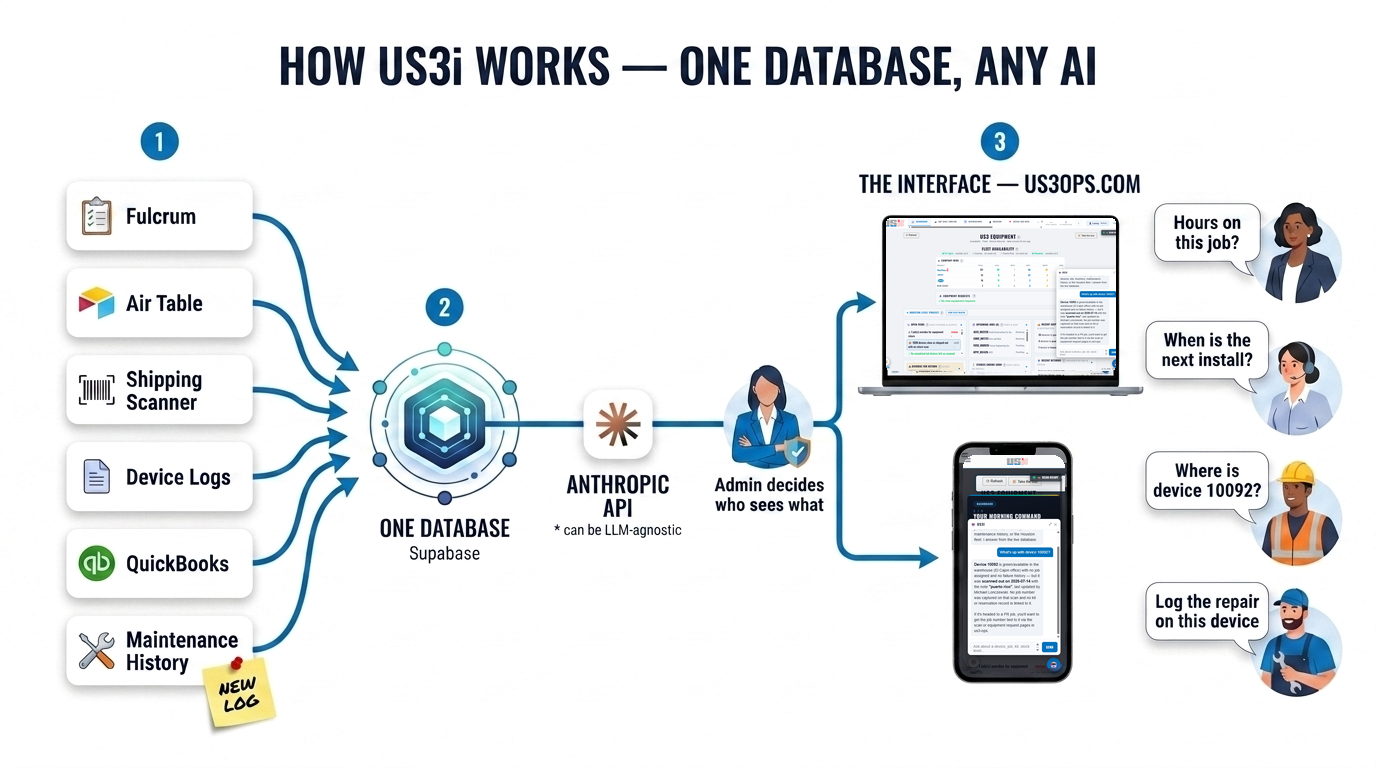
3. What happens when you ask a question
You ask
You type a question in the chat. Along with it goes the page you're on and your last few messages from this conversation, so follow-ups make sense.
Your sign-in is checked
Your question travels with your own us3ops sign-in — the same Google login you already used. The server double-checks it's really you and that you're an active US3 worker. No sign-in, no answer. There is no anonymous access, ever.
The AI reads the database — through a locked door
The brain is Anthropic's Claude, reached over their API (the plumbing is deliberately model-agnostic — the AI vendor could be swapped without rebuilding anything). It doesn't get the keys to the database; it gets a narrow, read-only window that only exposes the equipment tables listed in section 4. Everything in section 5 is unreachable by construction — there is no code path to it.
You get an answer with caveats attached
The answer comes back with honesty built in: US3i is told, on every single question, how fresh each data feed is — and it's instructed to say so when something is stale instead of pretending.
4. What it can read — and 5. what it can never see
✓ Can read (equipment ops only)
- Jobs — schedules, statuses, install/removal dates
- Devices & scans — where units are, ship/receive history
- Kits & inventory — counts, availability, reservations
- Maintenance history — field visits and repairs
- Red-tag / failure records — what broke and why
- Houston fleet health — the weekly upload
- Data freshness — how old each feed is right now
✕ Can never see (no code path)
- The people directory — roles, emails, offices, employment status. Anyone's. Including yours. Including the owner's.
- Per-person activity — it will not report on what a coworker has been doing
- PINs and sign-in secrets
- Job dollar values & payment status
- Customer contact lists — emails, phone numbers
- Admin configuration & system internals
6. What goes into its memory
Your conversation — stays in your browser
Chat history lives in your browser tab only (the last 16 messages). Your most recent messages ride along with your next question so follow-ups work. Close the tab — or hit New chat — and it's gone. We do not store your conversations on a server.
Its knowledge — a few admin-written notes
US3i's long-term "memory" is a small set of notes the admin maintains: what it's allowed to do, how US3 equipment workflows actually run, an automatically refreshed map of the database, and a daily data-freshness report. Tuning US3i means editing those notes — nothing it learns from you gets written into them.
No training on your questions
Questions and answers pass through the Anthropic API, which does not use API traffic to train its models. Your chats don't teach the AI anything permanent — about you or anyone else.
The one counter we keep
A rate limiter counts questions per person (60 an hour, keyed to your work email) so a runaway script can't burn the service down. That counter is the only per-person trace the system keeps, and it resets every hour.
7. Who decides who sees it
The admin does — the same per-person page permissions that control every other tab on us3ops.com. If you can see the US3i tab and the 🤖 button, you've been given access; if not, they simply don't exist for you. And the permission isn't just cosmetic: the server re-checks your sign-in and your active-worker status on every single question.
8. Honest limits
It can be wrong. US3i reads real data, but it's still an AI: for anything that matters, click through to the page it points you at and check the number there. The app page is the source of truth; US3i is the fast way to find it.
It's only as fresh as the feeds. The database mirrors the field tools on a schedule. US3i is told the age of every feed and will disclose staleness — believe it when it does.
The chat is read-only, forever. Nothing you ask US3i in a message can change a record. Any feature that changes data will be a button in the app with your name on the action — not a chat message.
The one thing it writes is a ticket. Once a night US3i reviews the operation — equipment still checked out past its deinstall date, a spike in red-tagged devices or unresolved failures, tickets nobody has touched in three days, a data feed that has gone quiet — and opens a ticket on the Tickets board when something genuinely needs a person. It files each distinct problem once, never re-raises one that is already open, and says nothing at all on a clean night. A ticket only ever asks a human to look; it changes no equipment record.